Can You Use a Mini Stepper Under a Desk?
You can use a mini stepper under a desk only if your knees and feet have enough room to move freely. Seated stepping can limit posture and may not suit a normal work setup.
On this page (9 sections)
- Can you use a mini stepper under a desk while seated?
- Why does knee clearance matter?
- Is seated stepping good for posture?
- Which mini stepper suits short standing sessions?
- Could a treadmill work better under a desk?
- What if you want a lighter mini stepper?
- How should you test a mini stepper under a desk?
- What are better alternatives for seated desk movement?
- So, can you use a mini stepper under a desk?
You can use a mini stepper under a desk only when your knees, feet, and pedals have clear space. Most seated desk setups limit the stepping motion, so a mini stepper usually works better for short standing sessions away from the desk.
A seated position also changes your posture. Your hips stay low, your knees rise toward the desktop, and the desk may stop you from using the full pedal range.
Can you use a mini stepper under a desk while seated?
You can try seated use only if the desk leaves room for your knees to rise and your feet to stay centered. Keep the movement slow at first, and stop if the desktop presses against your thighs or knees.
Measure the distance from the floor to the lowest part of the desk. Then sit in your normal chair and check where your knees reach before placing a stepper underneath.
A mini stepper is taller than a flat footrest. Its pedals also move up and down, so the clearance that looks adequate while still may disappear during each step.
Keep your back supported and your hips facing forward. If you must lean to one side, slide forward in the chair, or lift your heels to keep moving, the setup is not suitable.
Why does knee clearance matter?
Knee clearance matters because the pedals raise your feet and knees with every step. A desk that fits a stationary footrest may not fit a moving stepper.
Contact with the desk can interrupt the pedal path. It can also push you into a rounded back or twisted position as you try to keep stepping.
Clearance should include the desk underside, drawers, support bars, cable trays, and any chair arms that restrict your position. Check both sides because one obstruction can make the setup uneven.
If your desk is height-adjustable, raise it only enough to create a comfortable posture. You should still be able to type without lifting your shoulders or reaching too far forward.
Is seated stepping good for posture?
Seated stepping does not automatically produce good posture. The chair, desk height, screen position, and pedal movement all need to let you keep your back supported and your shoulders relaxed.
A stepper under a desk may encourage you to lean back, hunch forward, or look down at your feet. Those changes can make computer work less comfortable even when the stepping motion itself feels easy.
Use a short trial rather than a long work session. Check whether you can keep your feet level on the pedals, your knees pointed forward, and your hands in a normal typing position.
For general exercise guidance, review is a mini stepper good exercise before treating desk stepping as a complete workout.
Which mini stepper suits short standing sessions?
A mini stepper is usually more useful beside the desk than directly underneath it. Compare mini steppers and StairMaster machines for home workout differences.
You can stand upright, keep your eyes away from the pedals, and use the full movement without the desktop blocking your knees.
The Sunny Health & Fitness Mini Stair Stepper has adjustable step height, dual hydraulic cylinders, 2 included resistance bands, an LCD monitor, and a 300 lb capacity. Its footprint is about 15.7 x 12.4 in, and it arrives fully assembled.
The adjustable step height lets you choose a shorter or deeper range. Start with a comfortable setting and keep both feet centered before adding the resistance bands.
The bands add upper-body movements, but they are not useful when your hands need to stay on a keyboard. Use them only when you have moved away from the desk and can control the stepping rhythm.
Could a treadmill work better under a desk?
A treadmill can suit walking work better when you need to keep your hands at the keyboard. It still requires careful speed, screen placement, and posture, but it does not raise your knees toward the underside of the desk in the same way.
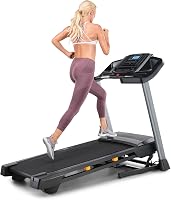
The NordicTrack T Series Treadmills for Home includes a folding frame, a 55 in deck, a 20 in deck width, speeds up to 10 MPH, and a 0–10% incline range. The T6.5S model has a 5 in LCD display and KeyFlex cushioning.
This is a much larger option than a mini stepper. Its listed dimensions are 73.5 in deep, 36 in wide, and 54 in high, with a folded size of 78.5 x 35.5 x 14.5 in.
Measure the room, desk position, ceiling height, and storage path before considering it. The folding frame helps with storage, but it does not make the treadmill a small under-desk device.
For a smaller walking setup, compare this walking pad treadmill guide. If you want more uphill work, see best incline walking pad.
What if you want a lighter mini stepper?
A smaller stepper can work for open-area cardio, but its size does not remove the need for knee clearance under a desk. If you are comparing stepping styles, see mini stepper vs side stepper.
You still need space for the pedals to travel and enough room to keep a stable seated position.
The Sunny Health & Fitness Mini Stepper w/LCD Monitor & Adjustable Step Height has adjustable hydraulic step height, 2 hydraulic cylinders, integrated arm resistance bands, non-slip pedals, and a 220 lb capacity. It measures 16.3 x 12.8 x 13.6 in and weighs 16.2 lb.
Its LCD monitor tracks time, calories burned, steps per minute, and count. Those features help you follow a short session, but they do not solve a desk's clearance or posture limits.
This stepper is 90% pre-assembled, with the resistance bands requiring attachment. Set it on a level surface and make sure the pedals move freely before stepping.
Readers who want support while exercising may prefer best mini stepper with handles. If you are choosing equipment for an older user, compare best mini stepper for seniors.
How should you test a mini stepper under a desk?
Test the setup without stepping first, then use a slow and brief trial. Sit normally, place your feet on the pedals, and check whether your knees, thighs, and chair remain clear.
Use this order:
- Measure the desk opening from the floor to the lowest obstruction.
- Place the stepper where both pedals are centered under your knees.
- Sit with your back supported and your shoulders relaxed.
- Move each pedal slowly through its range without forcing it.
- Step for a short period while checking your posture and knee clearance.
- Stop if the desk, chair, or pedal movement causes contact or strain.
Keep cords, bags, rugs, and chair wheels away from the pedals. A stable floor matters because a moving chair can change your position while you step.
If you use the stepper on wood flooring, follow this guide to protect a wood floor under exercise equipment.
What are better alternatives for seated desk movement?
A flat under-desk device may fit seated work better than a stepper. An under-desk elliptical or bike keeps the movement closer to the floor, although each still needs enough leg and pedal clearance.
Compare under desk elliptical vs under desk bike if your main goal is light movement while seated. Pay attention to knee height, pedal travel, noise, and whether you can keep your chair stable.
A walking pad is another option when you can walk while working. Compare mini steppers and walking pads for a closer look at the trade-offs.
It needs more floor length and a suitable desk height, but it avoids the repeated upward knee movement of a stepper.
Don't assume any device is safe to use while distracted. Keep the speed and resistance low enough that you can stop quickly and maintain control.
So, can you use a mini stepper under a desk?
A mini stepper under a desk can work for a short seated trial only when knee clearance and posture remain comfortable. For most people, standing beside the desk gives the stepper a better movement path and a more natural posture.
Choose the Sunny Health & Fitness Mini Stair Stepper if you want adjustable step height, resistance bands, and a 300 lb capacity. Choose the Sunny Health & Fitness Mini Stepper w/LCD Monitor if you want a similar compact format with non-slip pedals and a 220 lb capacity.
Choose the NordicTrack T Series Treadmills for Home when walking space matters more than a small footprint. If your desk restricts your knees, compare an under-desk elliptical, bike, or walking pad instead of forcing a stepper into the opening.
Frequently asked questions
Can you use a mini stepper under a desk while sitting?
You may be able to use one while seated if the desk leaves enough knee and pedal clearance, but a normal desk often limits the stepping range. Keep your back supported, stop if your knees contact the desk, and avoid using the stepper if you cannot keep a stable posture.
Is a mini stepper good for working at a desk?
A mini stepper can add short bursts of movement, but it may make typing, reading, and sitting upright harder. Use it for brief, focused sessions rather than assuming it works as a constant under-desk activity.
A walking pad may be easier if you need to keep both hands on your keyboard.
How much knee clearance do you need for a mini stepper?
You need enough vertical space for your knees to rise without touching the underside of the desk, plus enough room to place both feet securely on the pedals. Measure from the floor to the lowest desk obstruction, then compare that space with your seated knee position and the stepper's full movement.
What should you do if a mini stepper feels unstable under a desk?
Stop and move it to an open area where you can stand upright and control each step. Check that the floor is level, the pedals are clear, and your chair or desk is not forcing your knees or feet into an awkward position.
Don't continue through wobbling, pain, or loss of balance.